Resume templates and generator
One-page resumes in five designs, from a classic serif layout to a bold header and a sidebar, each in five colours. Fill in the form, watch the preview and download the PDF. Free, no signup.
Have an AI assistant? You don't have to type.
Copy this sentence, paste it into ChatGPT, Claude or another assistant and add your details. It reads the instructions and makes the PDF, or tells you how to connect it first.
Read https://pressa.dev/templates/resume/agent.md and make me a resume PDF in the Classic design. Here are my details: 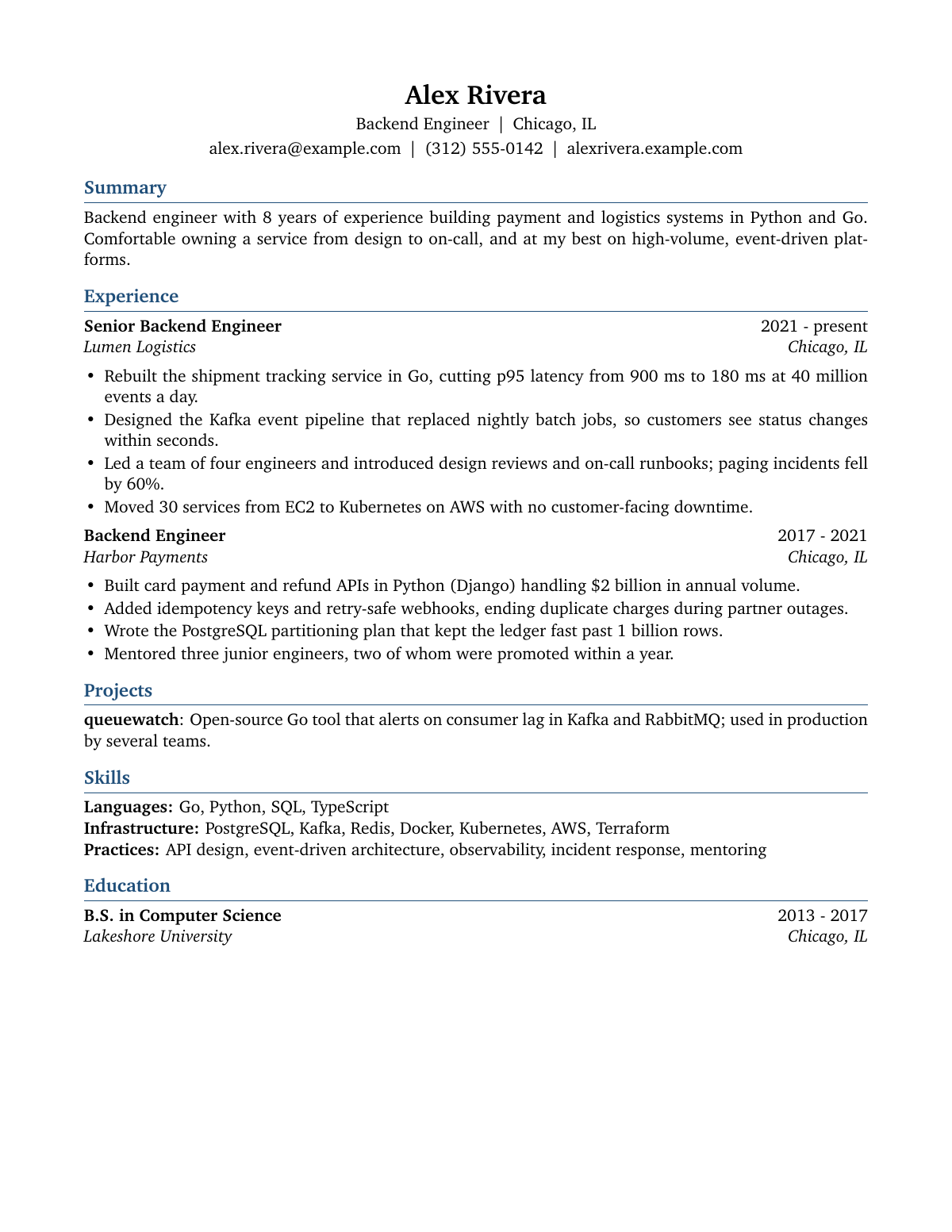
The designs
Every design takes exactly the same details, so you can type once and switch between them until one feels right: the classic serif layout recruiters and applicant tracking systems read without trouble, a clean modern sans-serif, a bold coloured header, a two-column layout with a sidebar, and an elegant layout with the headings in the margin. Each comes in five colours.
Goes well with
Use it with your AI assistant
The quickest way is the sentence at the top of this page: your assistant reads these instructions and makes the PDF, or tells you how to connect Pressa if it cannot yet. Assistants that can run commands (Claude Code, Cursor, Codex) do it all on their own.
Or connect Pressa yourself once, then ask for the document in plain words. Your assistant asks for anything it is missing, fills the template and hands you the PDF. To change something later, just say what.
- Connect Pressa. In Claude Code run the command below; other assistants that support MCP take the address
https://api.pressa.dev/mcp.Terminalclaude mcp add --transport http pressa https://api.pressa.dev/mcp - Ask, for example:You
Use the Pressa template "classic-resume" and fill it with my details. Here is what I have: ...
For developers and automations
Send the fields as JSON and get a link to the PDF. It works without a key for a few documents a day; with a free key you get 50 a month. In n8n this is one HTTP Request node, set up as in the n8n guide.
Each design has its own slug, classic-resume, modern-resume, banner-resume, sidebar-resume, elegant-resume, and they all take the same data. Add "color": "teal" next to data for another colour.
curl -X POST https://api.pressa.dev/api/v1/public_templates/classic-resume/render \
  -H "Content-Type: application/json" \
  -d @data.json
Sample data.json
{
  "data": {
    "name": "Alex Rivera",
    "headline": "Backend Engineer",
    "location": "Chicago, IL",
    "email": "[email protected]",
    "phone": "(312) 555-0142",
    "website": "alexrivera.example.com",
    "summary": "Backend engineer with 8 years of experience building payment and logistics systems in Python and Go. Comfortable owning a service from design to on-call, and at my best on high-volume, event-driven platforms.",
    "experience": [
      {
        "title": "Senior Backend Engineer",
        "company": "Lumen Logistics",
        "location": "Chicago, IL",
        "dates": "2021 - present",
        "highlights": [
          "Rebuilt the shipment tracking service in Go, cutting p95 latency from 900 ms to 180 ms at 40 million events a day.",
          "Designed the Kafka event pipeline that replaced nightly batch jobs, so customers see status changes within seconds.",
          "Led a team of four engineers and introduced design reviews and on-call runbooks; paging incidents fell by 60%.",
          "Moved 30 services from EC2 to Kubernetes on AWS with no customer-facing downtime."
        ]
      },
      {
        "title": "Backend Engineer",
        "company": "Harbor Payments",
        "location": "Chicago, IL",
        "dates": "2017 - 2021",
        "highlights": [
          "Built card payment and refund APIs in Python (Django) handling $2 billion in annual volume.",
          "Added idempotency keys and retry-safe webhooks, ending duplicate charges during partner outages.",
          "Wrote the PostgreSQL partitioning plan that kept the ledger fast past 1 billion rows.",
          "Mentored three junior engineers, two of whom were promoted within a year."
        ]
      }
    ],
    "projects": [
      {
        "name": "queuewatch",
        "description": "Open-source Go tool that alerts on consumer lag in Kafka and RabbitMQ; used in production by several teams."
      }
    ],
    "skills": [
      {
        "category": "Languages",
        "items": "Go, Python, SQL, TypeScript"
      },
      {
        "category": "Infrastructure",
        "items": "PostgreSQL, Kafka, Redis, Docker, Kubernetes, AWS, Terraform"
      },
      {
        "category": "Practices",
        "items": "API design, event-driven architecture, observability, incident response, mentoring"
      }
    ],
    "education": [
      {
        "degree": "B.S. in Computer Science",
        "school": "Lakeshore University",
        "location": "Chicago, IL",
        "dates": "2013 - 2017"
      }
    ]
  }
}
Fields, sample data and instructions as JSON: GET https://api.pressa.dev/api/v1/public_templates/classic-resume. Source, free under the MIT license, on GitHub.
Questions
- Is it free?
- Yes. Without an account you can make 3 PDFs a day. A free account gives you 50 a month, no card needed.
- Is my data stored?
- What you type stays in your browser, so you can come back to it. The finished PDF is kept only so you can download it: the link works for 1 hour without an account and 24 hours with one, and the file is deleted within about a day. If a PDF cannot be built, the error report can quote a few lines of what you typed; it is kept with the usage records.
- What is the small line at the bottom?
- Free PDFs carry a small "Made with Pressa" line at the foot of the page. The Starter plan ($9 a month) removes it.
- Can I switch designs after typing my details?
- Yes. All 5 designs take the same details, so picking another one or another colour keeps everything you typed. The preview shows the change right away.
- Is the preview free?
- Yes. The preview beside the form does not count against your free PDFs. It is marked PREVIEW; Download PDF makes the finished document.
- Can I make these automatically?
- Yes. The same template works from your AI assistant, from n8n and through the API with JSON data. See the sections above.