Your next document,
without Word.
Still writing documents by hand? Let your AI do it for you.
Which AI do you use?
Building an app? Call the API, no key needed
curl -X POST https://api.pressa.dev/api/v1/compile \
  -H "Content-Type: application/json" \
-d '{"latex":"\\documentclass{article}\\begin{document}Hello\\end{document}"}'The same quote, twice
On the left, as written in Word. On the right, what the AI made from that file and one sentence with Pressa: "Here is our quote in Word. Keep every number and make it a professional PDF with Pressa." Nothing was fixed by hand.
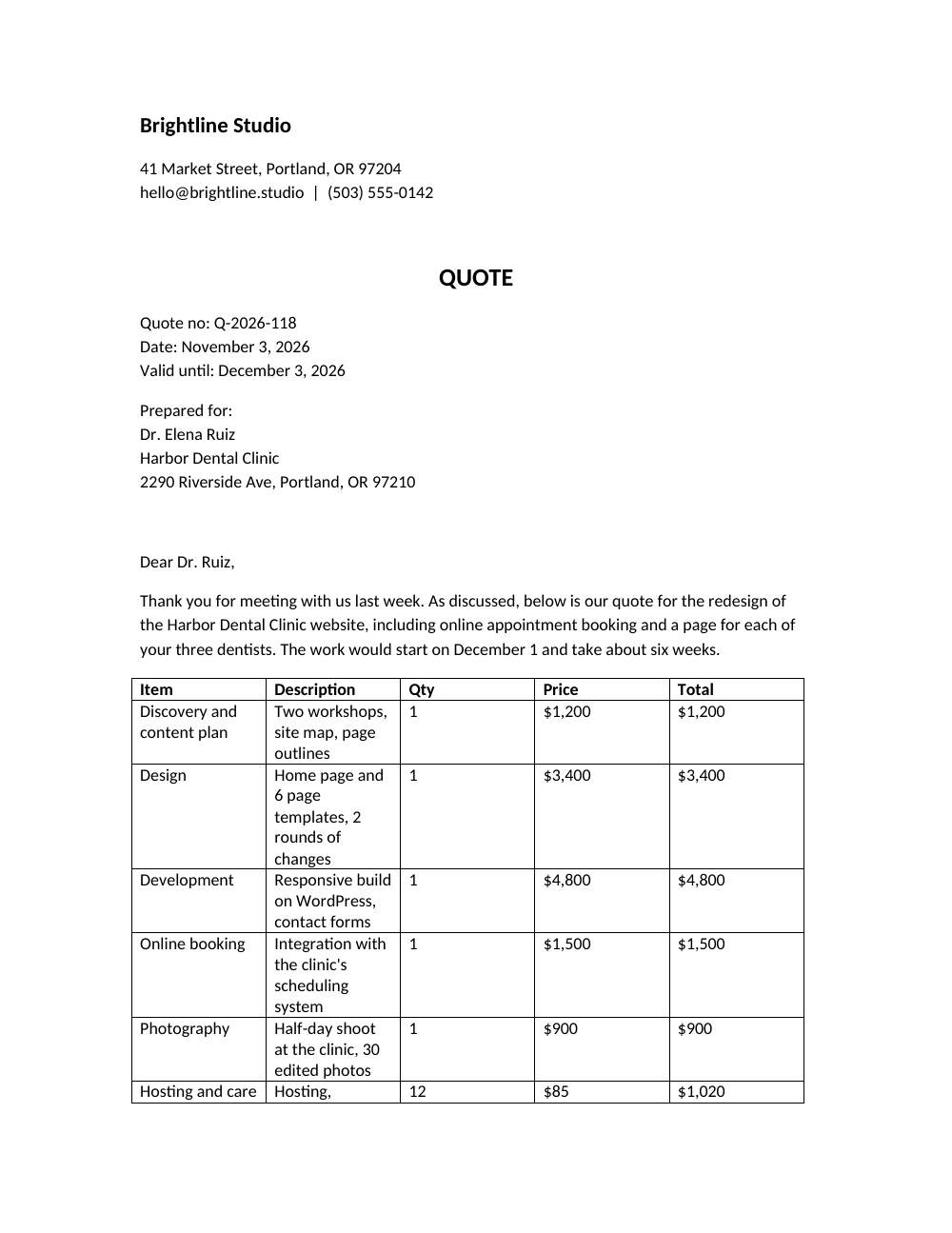
- ✗The items wrap into a tall grid
- ✗The total sits in a plain line under the table
- ✗It runs onto a second page
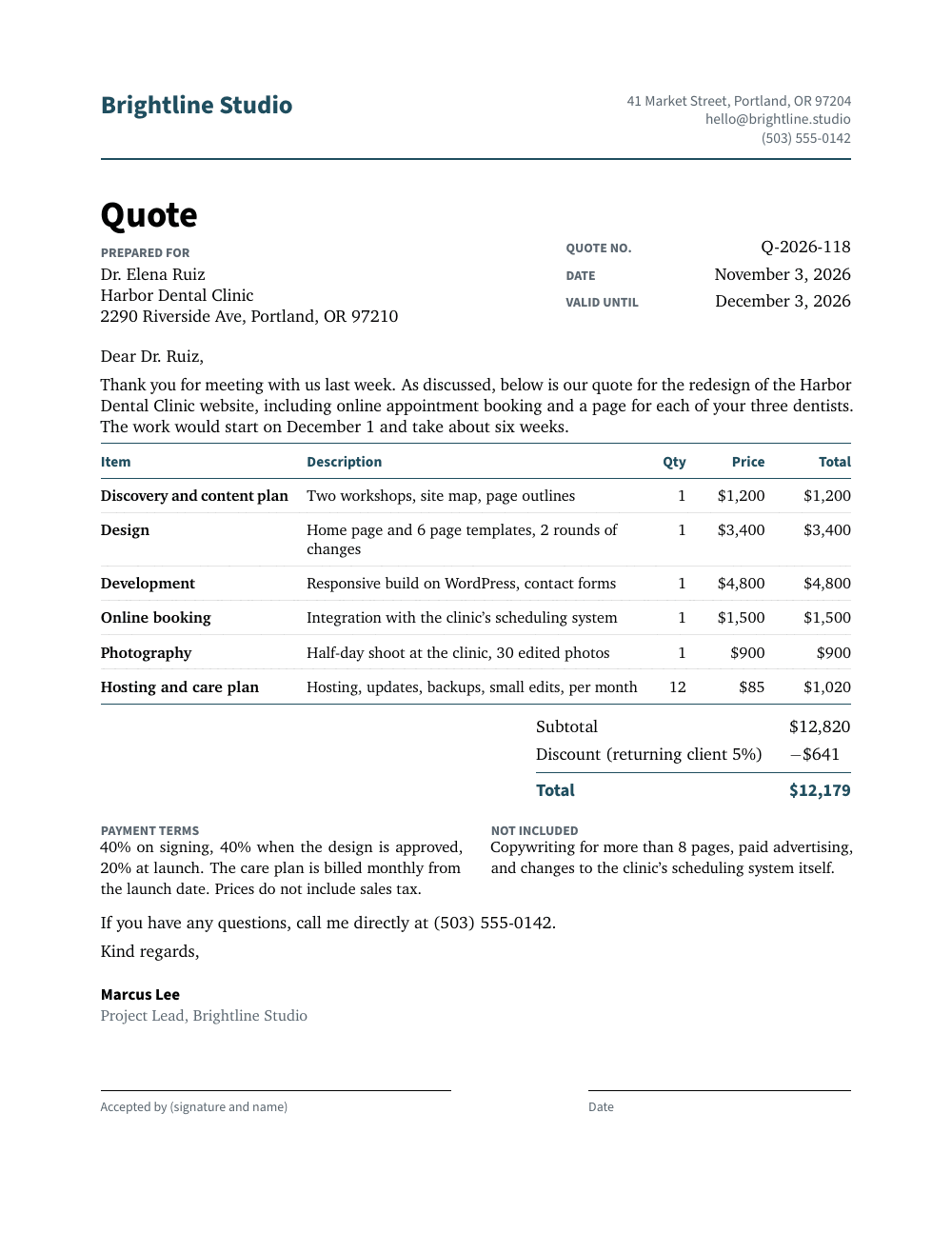
- ✓The items in one clean table
- ✓The total stands out
- ✓Signature lines included, all on one page
Set up in a minute
Connect it once to the AI you already use. No account, no API key to start.
Connect Pressa to your AI
Pick the app you use and follow its steps. In Claude it is one button that opens the connector form with Pressa already filled in; in Claude Code, Codex and Cursor your assistant does it for you.
Ask for your document
Attach your Word file or your notes, or just describe what you need in plain language. Say "with Pressa" so your assistant uses it.
"Here is my Word file. Keep the content and make a professional PDF of it with Pressa."
Iterate until perfect
Not quite right? Just say what to change. Your AI updates the document and gives you a new PDF instantly.
"Add an executive summary on page 1 and move the charts to an appendix. Also bump the font size up a notch."
Drop into any stack
Document infrastructure for your app or agent: your backend sends data, an LLM writes the document, Pressa compiles the PDF. One endpoint, any language, production-ready output.
About a second
A typical document compiles in under a second, fast enough to generate inline.
Isolated and short-lived
Each compile runs in its own workspace without shell escape. Signed links expire, and files are deleted within a day (a week while open in Studio).
Open source clients
The CLI and MCP server are MIT licensed, on GitHub.
How your app talks to Pressa
Your app sends document data to the Pressa API and gets a PDF URL back. You describe what you need - an LLM handles the formatting for you.
The complete integration
Three steps in your backend: get your data, describe the document, send it to Pressa.
// 1. Get data, 2. Describe document, 3. Get PDF
const invoice = await db.invoices.find(id);
const latex = await llm.generate(
  `Create an invoice for ${invoice.company}...`
);
const pdf = await fetch(
  "https://api.pressa.dev/api/v1/compile",
  { method: "POST", body: JSON.stringify({ latex }) }
);

// pdf.pdf_url → "https://api.pressa.dev/api/v1/pdfs/a1b2c3"
// pdf.compilation_time_ms → 842
Works with any language. Full API reference in the docs.
No key needed to start. A free account raises the limit to 50 compilations per month and allows image assets. Paid plans add saved templates and the render API.
Predictable pricing
Start free. Pay only for the documents you make.
Starter
500 documents / month
- ✓Up to 20 pages / document
- ✓10 saved templates
- ✓Email support
Pro
2,000 documents / month
- ✓Up to 100 pages / document
- ✓All compilers incl. lualatex
- ✓50 templates & priority queue
Business
10,000 documents / month
- ✓Up to 500 pages / document
- ✓Unlimited saved templates
- ✓Priority support & 99.9% SLA
Annual plans available - save up to 22%
Compare all plans →Frequently asked questions
Everything you need to know.
Yes. Attach the file in your AI app and say: "Here is my Word file. Keep the content and make a professional PDF of it with Pressa." The assistant keeps your text and lays it out as a professional PDF. pressa.dev/examples shows four Word files next to the PDFs made from them.
Claude (claude.ai, the Claude app on Mac and Windows, and Cowork), Claude Code, Codex, Cursor, Grok and other apps that can add an MCP server. In ChatGPT, custom connectors need developer mode, which OpenAI offers on Business, Enterprise and Edu workspaces. pressa.dev/connect has the steps for each app.
No. Open pressa.dev/connect and pick the AI app you use. In Claude it is one button that opens the connector form with Pressa filled in; Claude Code, Codex and Cursor connect it themselves after asking you. No account or API key is needed to start.
No. You describe what you want in plain language and your AI assistant handles the rest. Pressa uses LaTeX under the hood for the professional layout, but you never need to see or write any of it.
Every document is compiled in an isolated workspace with shell escape disabled, and PDFs are delivered through signed links that expire. Without an API key the source is never stored; with an account, the PDF and a copy of the source are deleted after 24 hours (7 days once opened in Studio). Nothing is archived.
Your AI assistant gets the error with the line that caused it and a suggested fix, and corrects the document itself. You do not have to debug anything.
Anything that needs professional formatting: quotes, invoices, letters, reports, minutes, contracts, resumes, certificates and academic papers. Under the hood is the full TeX Live distribution with thousands of packages; pdflatex and xelatex on every plan, lualatex on Pro and Business.
One endpoint: POST your LaTeX source and get a signed PDF link back, usually in under a second. It works from any language, and a first call needs no account or key. pressa.dev/docs has the reference.
The CLI and the MCP server are open source (MIT license) and on GitHub. The compile service is hosted, with a free tier.
The document you need today, made by your AI
Connect Pressa to the AI you use, then ask. Free to start, no card.